
Are Slow Quotes Costing You Customers?
How many jobs did you lose last month because a competitor simply answered faster?
You probably can't say. That's the real problem.
Here's a scene you might know. A buyer emails a drawing at 5pm and wants a price by morning. Now the hunt starts. Someone digs up an old quote in Excel, someone else checks material rates in Tally, and a third person calls the supplier because steel prices moved (again). Half of it is guesswork. Then the quote lands on the MD's desk, and he checks every number himself, usually after the floor closes. By the time it goes out, the customer already has a price from someone quicker.
By the numbers: In a 2025 survey of 200 U.S. manufacturing decision-makers, 71% said quotes take at least a day, and 88% said they'd lost sales because of manual quoting. One Bloomfield benchmark shows win rates of 42% for same-day replies, but only 12% after five days or more.
Speed isn't the only issue though. Typing the same data into three places creates mistakes, and one forgotten setup cost can quietly eat a job's margin. Plus, a late, messy quote makes your shop look smaller than it is, especially to a big buyer comparing you with three others.
That's where job shop quoting software comes in. It pulls your costs into one place, applies your rules the same way every time, and helps you send fast quotes for manufacturing work in hours, not days. The goal isn't fancy tech. It's accurate job costing, a better shot to improve your quote win rate, and getting the MD out of the middle.
First, though, let's look at what the old way is really costing you.
The Hidden Costs of Manual Quoting: It's More Than Just Wasted Time

Slow quotes are the loud problem. The quiet ones cost more, because nobody sees them on a bill.
Jobs You Win But Lose Money On
This one hurts. You celebrate the order, then the margin disappears on the shop floor.
Take a 2026 fabrication shop analysis. A shop sold a $340,000 project at an expected 18% margin. It ended with $12,000 in net profit, about 3.5%. The labor rate in the quote skipped overhead, shift differentials and overtime. Nobody was careless. The sheet just didn't have a place for them.
Here's the nasty part. The same mistake gets copied into the next quote, and the next one. In another case, a shop found its bending work was underpriced by 15% because fixture setup time was never counted. Fixing that added more than $30,000 to the bottom line without making a single extra part.
Weak job costing doesn't show up as one big loss. It shows up as many small ones, and you only find out when the quarter closes.
The Big Jobs That Never Come Back
A complex RFQ takes about 11.5 hours of real work to price by hand. Roughly 7.5 of those hours go to just gathering and checking data. Your best people spend a full working day chasing numbers instead of looking at the drawing.
And because that work gets squeezed between production calls and supplier replies, it stretches over days. A large buyer with a big order rarely waits. They go with whoever answered first, and you never hear why.
Typing the Same Data Three Times
Most shops don't have one system. They have Excel for the quote, Tally for rates and invoices, and an ERP that's half in use. Someone retypes the same part number, grade and quantity in each place.
One 2025 survey of 500 professionals put manual data entry at about $28,500 per employee each year. That's an average, not a number for your shop. But think about who's doing the typing in yours. Usually it's your most experienced person.
Then the errors travel. A wrong material grade means wrong purchasing. A wrong quantity means a wrong invoice, and a mismatched invoice can cause trouble with GST filing and input tax credit. (I'm connecting those dots from how shops work, not from a study.)
Manual vs. Automated Quoting
Here's how the two ways of working compare.
Metric | Manual quoting | Automated quoting |
|---|---|---|
Time | Days, with data pulled from four places | Hours, with one shared record |
Accuracy | Depends on who's typing and who remembers | Same rules applied every time |
Labor cost | Senior staff spend hours on data hunting | Staff review exceptions only |
Opportunity cost | Faster competitors win the big jobs | Quotes go out while the buyer is still looking |
So what does the fix look like, and what is it not? Let's sort that out next.
What Exactly is Job Shop Quoting Software? (And What It Isn't)
Let's keep this simple, because the name sounds fancier than the idea.
The Plain-English Definition
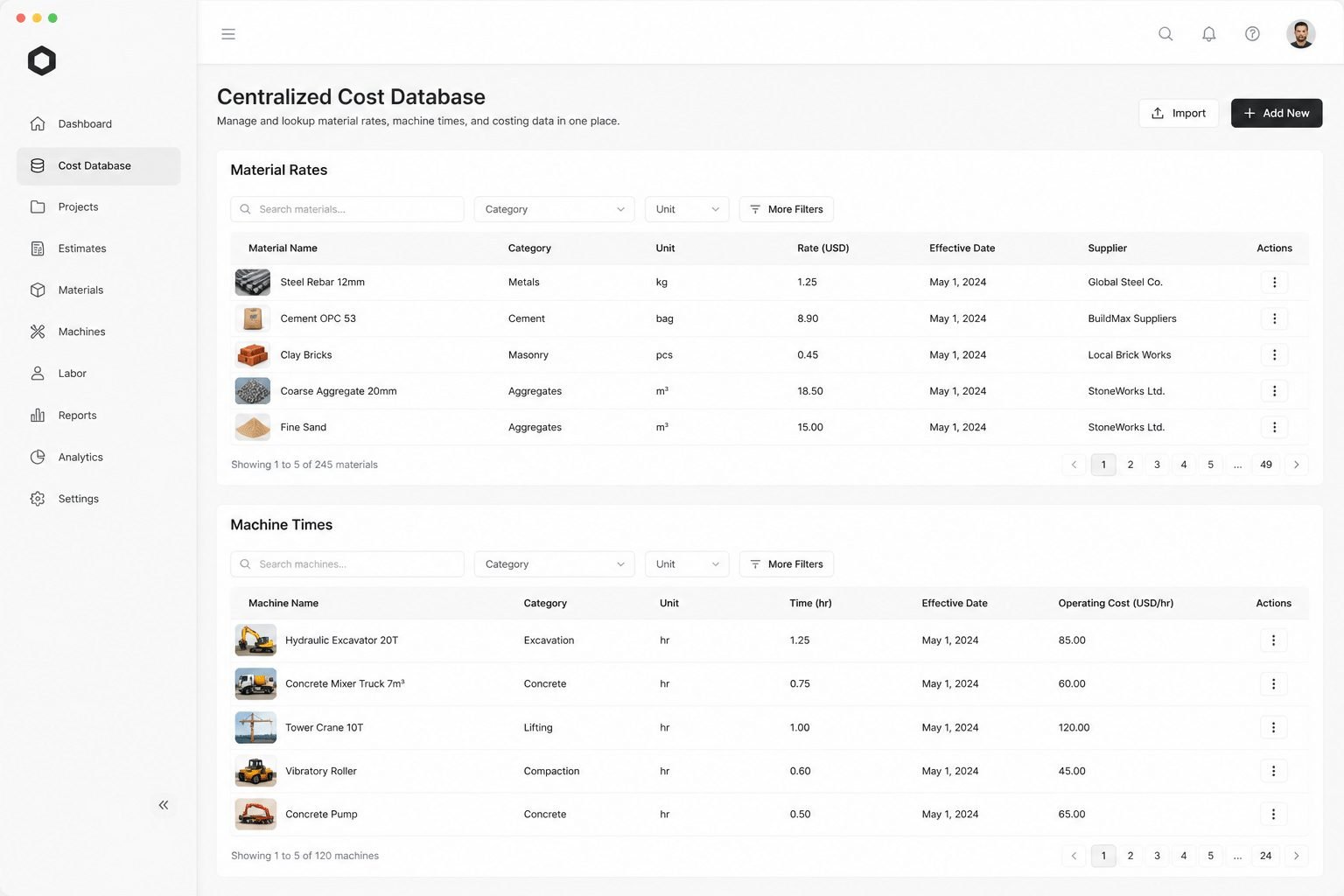
Job shop quoting software is one central place where your material costs, labor rates, machine times and overheads live together. A drawing comes in, and the system builds the price using your rules. Not a guess. Not last year's number copied forward.
You'll also see it called job shop estimating software or manufacturing quoting software. Same thing. A good one, as Uptool explains, gives your estimating rules, memory and repeatability. And a modern platform, according to AMFG, handles time and cost, materials, surface treatments, quantity pricing and a customer-ready PDF.
It doesn't remove your people. It flags missing tolerances or odd finishes, then your estimator reviews just those exceptions.
What It Isn't: Tally, Excel or That Half-Used ERP
Here's where most shops get stuck. They think they already own this. Usually they own a cousin of it.
Tool | What it's good at | Where it breaks for quoting |
|---|---|---|
Tally or accounting software | Taxes, invoices, quotation documents | No machine rates, setup logic or routings |
Excel sheets | Flexible, familiar, cheap | Errors creep in, and only one person understands the formulas |
Generic ERP quoting module | Links to orders and stock | Rigid, and often used at 30 to 40% of its power |
Job shop quoting software | Models the cost of making the job | Needs your real rates loaded first |
The Excel problem is the sneaky one. The sheet works because Ramesh built it, and Ramesh remembers why cell F12 is multiplied by 1.15. Ramesh goes on leave and the quote stalls. Bystronic points out that scattered information about stock, cutting, bending and capacity leads to inconsistent pricing. Sound familiar?
Manual vs. Automated: The Flow at a Glance
Picture the two paths side by side.
Step | Manual way | Automated way |
|---|---|---|
RFQ arrives | Email, WhatsApp or phone, files saved by hand | One RFQ record with drawings and notes grouped |
Data entry | Retyped into Excel, Tally and the ERP | Entered once, reused everywhere |
Costing | Material, setup, cycle time and overhead worked out by memory | Your rules applied the same way each time |
Review | MD checks every number | Only unusual items get flagged |
Sending | Formatted by hand | Clean quote PDF generated |
Follow-up | Whoever remembers | Outcome and assumptions saved for next time |
The Real Point: Know the Margin Before You Say Yes
Here's the part people miss. The document isn't the product. Any tool can make a PDF.
The real value is modeling the job's profit before you commit to it. You can see what happens to margin at 50 pieces versus 500, or what a long fixture setup does to a small batch. You learn the job is thin before the customer signs, not after the quarter closes.
So what should you look for when you shop around? Let's get into that after we see what the right system changes for your business.
From Cost Center to Profit Driver: 3 Ways Quoting Software Transforms Your Business

Most owners see quoting as a chore. It eats hours, wins nothing by itself, and sits in the "cost" bucket. Fair enough. But once the process is fixed, it turns into one of the few places where small changes pay back fast.
Here are the three changes I'd watch for.
1. Speed: Answer First, Win More
The buyer who emailed at 5pm doesn't want a perfect quote. They want a good one before the competition sends theirs.
A 2026 strategy article describes an anonymized 35-employee CNC shop that cut turnaround from three to five days down to under 24 hours. Its win rate reportedly went from 18% to 60%. Big caveat: that's a vendor-style article, and the shop changed several things at once. So treat it as a sign of what's possible, not a promise.
A named example is Pindel Global Precision. After adopting Paperless Parts, it doubled its yearly quotes to 700 and raised its win rate by about 30%. (The case study doesn't say if that's 30 points or 30% better. Either way, it's real movement.)
Then there's the re-quote. The customer calls back and says, "Make it 500 pieces, not 200, and add zinc plating." The old way means starting over. With software, you change the quantity and the finish, and the price updates using the same rules. Five minutes, not an evening.
Quick win: Faster quoting means you can bid on more jobs with the same people. You don't need a bigger estimating team. You need less typing.
2. Accuracy: Know Your Margin Before You Say Yes
This is the benefit nobody brags about, and it might matter most.
Remember the shop that sold a $340,000 job and kept only 3.5%? That was a costing problem, not a selling problem. Software fixes it by keeping setup time, machine rates, overhead and material prices in one place. The estimator doesn't need to remember them. The system applies them.
Northeast Manufacturing saw a 100% increase in its RFQ win percentage after adopting Costimator. Here's the interesting bit, though. The same case study says the software also helped them stop chasing jobs that would have lost money. Winning more is nice. Winning the right jobs is better.
So the "unknown margin" problem gets smaller. You can check the profit at 50 pieces versus 500 before you reply, not after the quarter closes. And if your quoting tool shares data with your ERP and Tally instead of fighting them, nobody retypes anything. That's the idea behind how Cluxn builds systems for MSME manufacturers: work with what you already run, and cut the disconnected pieces.
3. Professionalism: Look Like the Shop You Really Are
Let me be upfront. I couldn't find a solid study that proves a nicely formatted quote raises a buyer's trust by some exact percentage. Anyone who quotes you that number is guessing.
But think about the buyer's side. A large OEM is comparing four vendors. One sends a plain spreadsheet with no revision number. Another sends a clear PDF with a quote number, material spec, lead time and validity date. Which shop feels safer to hand a purchase order?
Tools like aPriori describe shared visibility into cost breakdowns, process assumptions and margins. That same clarity can show up in what your customer sees.
What the buyer sees | Spreadsheet quote | Software-generated quote |
|---|---|---|
Branding and IDs | Often none | Logo, RFQ and quote number |
Assumptions | Hidden in cells | Material, finish, exclusions listed |
Quantity pricing | One number | Clear price breaks |
Revisions | "Finalv3new.xlsx" | Version and date tracked |
Illustrative comparison, not a real customer's quote.
You may be the better shop already. A consistent, detailed quote just lets the buyer see it. Next, let's look at which features actually deliver these three benefits.
The Buyer's Checklist: 4 Must-Have Features in a Job Shop Quoting System
Every demo looks great. The data is clean, the drawing is simple, and nothing ever breaks. Your shop isn't like that. So here's a checklist you can carry into any vendor call, and one rule: ask them to prove each point using one of your old RFQs.
Feature 1: One Place for Every Cost
If your steel rate lives in Tally, your machine rate lives in Ramesh's head, and your setup times live in an old email, the software has nothing solid to work with. You want a single cost database.
Material, labor and machine rates in one spot. No hunting.
Easy updates. Someone on your team should change a steel price in two minutes, without raising a ticket with the vendor.
Change history. You should see who changed a rate and when.
Red flag: the vendor says they'll "set the rates for you" and you can't touch them later.
Feature 2: Plays Nicely With Tally and Your ERP
This is the one owners worry about most, and fair enough. A new tool that adds a fourth place to type data is worse than no tool. Outside processing is a good test, because a quote might include plating or heat treatment, and your system then has to turn that into purchase orders and track the work while it's off-site.
Pulls stock, customer and rate data from your existing systems.
Pushes an accepted quote into a job or sales order, with no retyping.
Lets you leave. Ask, "If I stop paying, can I export all my data?" Many owners fear lock-in more than price, and that question tells you a lot.
This is also where a partner like Cluxn fits: building around what you already run, not asking you to rip it out.
Feature 3: Formulas That Bend to Your Shop
A sheet-metal job and a molded part are priced very differently. Fabrication cares about bends, weld length and material yield. Injection molding cares about shot weight, cavity count, resin and tooling status. A system with one fixed markup calculator can't handle both. Honestly, it probably can't handle your shop either.
Editable formulas and templates for your own processes.
Visible cost drivers. You should see why the price is what it is, not just a final number.
No forced workflow. If you have to change how you work to suit the tool, walk away.
Feature 4: Quoted vs. Actual Reports
This is the feature most shops skip, and it's the one that pays you back over time. After the job ships, the system should compare what you said it would cost with what it did cost. That's how the bending shop from earlier would have caught its missing setup time months sooner. Quoted-versus-actual is especially useful in high-mix shops where every job has a different routing.
Estimated vs. actual material, labor, setup and outside work.
Win rate and loss reasons by customer and job type.
Margin by job, visible without waiting for the quarter to close.
Your Quick Scorecard
Feature | Ask the vendor to show you |
|---|---|
Central cost database | You updating a rate yourself, live |
Integration | A quote flowing into a job with no retyping |
Custom formulas | One of your real, odd jobs priced correctly |
Post-quote reports | A quoted vs. actual report from sample data |
If a tool misses two of these four, keep looking. And even a great tool can flop if the rollout goes badly, so that's where we're headed next.
How to Implement Quoting Software Without Repeating Past Failures
Let's talk about the elephant in the room. Maybe you've done this before. A consultant took the advance, set something up, and slowly stopped picking up the phone. Or the ERP went in, and two years later it's running at 40% while everyone goes back to Excel.
If that's you, your caution is fair. It's not a lack of tech skills. It's experience.
Pick a Partner, Not Just a Vendor
The product matters less than the people setting it up. One 2026 analysis of ERP failures found that 35% involved inexperienced project teams, often on the partner side. So judge the team, not only the demo.
Here's what a real partner usually offers:
A named person who owns your project, with a phone number that works
Written duties for both sides, so nobody is guessing
Setup using your rates and your old RFQs, not sample data
Data export on request, so you can always walk away
Support after go-live, with dates on the calendar
That last one is the lock-in test. If they get nervous when you ask, that tells you plenty.
Start Small: Quoting First, Everything Else Later
You don't need to change the whole factory. Honestly, you shouldn't. An IoT Analytics report says 54% of small and medium plants still use some mix of paper and spreadsheets for shop-floor work. Most shops are starting from there, so slow and steady is normal.
Quoting is a good first step because it's self-contained. It's also where a win shows up in days.
Phase | What happens | How you know it worked |
|---|---|---|
1. Load the rates | Material, machine and labor rates go into one place | Your team can change a rate without calling anyone |
2. Test on old jobs | Re-price 10 past RFQs and compare with what you really charged | Numbers match, or you spot where old quotes were off |
3. Run side by side | Old and new methods run together for a few weeks | Quotes go out faster, with no new errors |
4. Connect the rest | Link Tally and your ERP once quoting is steady | An accepted quote becomes a job with no retyping |
Nothing stops production during any of this. And if phase 2 goes badly, you've lost a few days, not a quarter.
Get Your Ops Manager and Estimators on Board Early
This part gets skipped, and it sinks projects. The Ops Manager or the senior estimator can quietly kill a tool they never wanted. I wouldn't blame them. They've seen "new systems" come and go.
So flip it around:
Invite them to the demos. Let them bring their ugliest RFQ and watch the tool handle it.
Ask what annoys them most. Hunting for rates? Chasing the MD for approval? Build the pilot around that.
Pick a champion. One respected estimator who tests first and explains it in plain words.
Listen to objections. Prosci recommends early communication and real listening, because people support what they helped shape.
And remember Ramesh, the guy who holds the Excel formulas in his head? Make him the hero. His knowledge goes into the system, and he stops being the single point of failure. Most people like that deal.
This is also how Cluxn works with MSME manufacturers: one workflow at a time, built around what you already run. Once you've got the rollout plan, there's just one step left, which is deciding where to begin.
Stop Quoting, Start Winning
Let's wrap this up plainly. In 2026, quoting by hand isn't a harmless habit. It slows you down, hides your margins, and makes a good shop look smaller than it is. The MD ends up as the glue holding Excel, Tally and a half-used ERP together. That's not a plan. That's a risk.
The good news? The fix doesn't need a factory-wide overhaul. Good job shop quoting software gives you three things:
Speed. You answer first, so you win more of the jobs you already chase.
Accuracy. You see the margin before you say yes, not after the quarter closes.
A base to grow on. Your rates, rules and past quotes live in one place, not in one person's head.
And you don't have to take my word for any of it.
Your First Step: A One-Week Audit
Before you look at any software, spend one week auditing how you quote today. Keep it simple:
What to track | How |
|---|---|
Quotes sent | Count every RFQ you answer this week |
Time per quote | Note the hours from request to sent, not just the typing |
Win rate | How many quotes turned into orders |
That's it. No tools, no cost, no vendor calls. The numbers will speak for themselves. Maybe you'll find quotes taking four days. Maybe you'll find your "busy" estimator spends most of the week hunting for rates. Either way, you'll finally know what slow quoting costs you. (And you'll have a much better answer to the question I asked at the start.)
One more thing. The shift is already happening. Rockwell Automation's latest research says 59% of manufacturers already use smart manufacturing technologies. Quoting is one of the easiest places to begin.
Want a Second Pair of Eyes?
If you'd like help reading your audit, Cluxn is happy to sit down with you. No hard sell. We'll look at how your shop gets RFQs, builds costs and approves margins, then map out one or two practical fixes, built around the systems you already run. You keep your data, and you decide the pace.
Ready to find your quoting bottleneck? Talk to Cluxn about a quoting workflow review and leave with a clear roadmap, not a pitch.